
Every DER program starts with a decision that sounds simple. A utility has approval from its regulators, or board approval, or a grant has been approved, and wants to run a battery program, or a thermostat program, or managed EV charging. Then months pass before a member can sign up.
They go to counsel reviewing terms, to whoever can edit an enrollment page on the website, and to an OEM conversation that restarts every time the device list changes. It’s sequencing and operational coordination that is mandatory, and slows things down.
But not all of the delay is inherent to the program. Some of it is software making the coordination harder than it needs to be. The OEM conversation shouldn't restart every time someone updates a device list. Publishing an enrollment link shouldn't require a web developer. Migrating an existing program shouldn't mean manually matching devices to accounts in a CSV. Delays like those compound and can make getting programs launched even slower, which pushes ROI of the programs back even further.
What it looks like when software is no longer part of the problem
A coop we work with launched a managed EV charging program on Texture and enrolled 100 devices in the program's first 30 days.
That speed didn't come from cutting corners. Counsel still reviewed terms, and the OEM integration still required configuration. What changed was that the software stopped being one of the things they were waiting on.
And once the right operational pieces were in place, enrollment could move quickly.
How grid flexibility program setup works in Texture
Quick note on OEM integrations: Texture has built and maintained 50+ direct integrations with battery, EV charger, inverter, and thermostat manufacturers.
Here's what the actual program setup and configuration flow looks like.
Step 1: Configure the program and enrollment flow
Create a new program from the Programs tab. Set the name, the geographies it covers, your terms and conditions, and the content a member sees during signup.
The enrollment flow is configurable stage by stage — compliance fields, terms acceptance, device connection. Device connect sends the member to their manufacturer to authorize access, and the connected device comes back attached to their enrollment.
Texture guides you through a transparent and configurable setup process. Go to the Programs tab and start a new program. Enter the name, the geographies it covers, and your terms and conditions, along with the rich content and metadata a member sees during signup.
Our configurable enrollment flow lets you define the stages a customer moves through and the requirements at each stage, including compliance fields, terms acceptance, and device connection.
Device connect sends the member to their manufacturer to log in and authorize access, and the connected device comes back attached to their enrollment. Texture integrates batteries, EV chargers, inverters, and thermostats through direct OEM partnerships.
Step 2: Migrate devices from an existing program
If you're moving a program that already exists, Texture can pull the device list from your OEM and assign each device to a customer and site. Members who've already authorized their devices typically don't need to re-enroll.
Step 3: Go live
Flip the program live and members can sign up. You will see all new enrollments through Texture, validated against your member list, and ultimately appearing in the Lifecycle Enrollments funnel with a timeline for each participant.
From there the same platform handles dispatch, measurement, and settlement without a second system.
What about customers and sites?
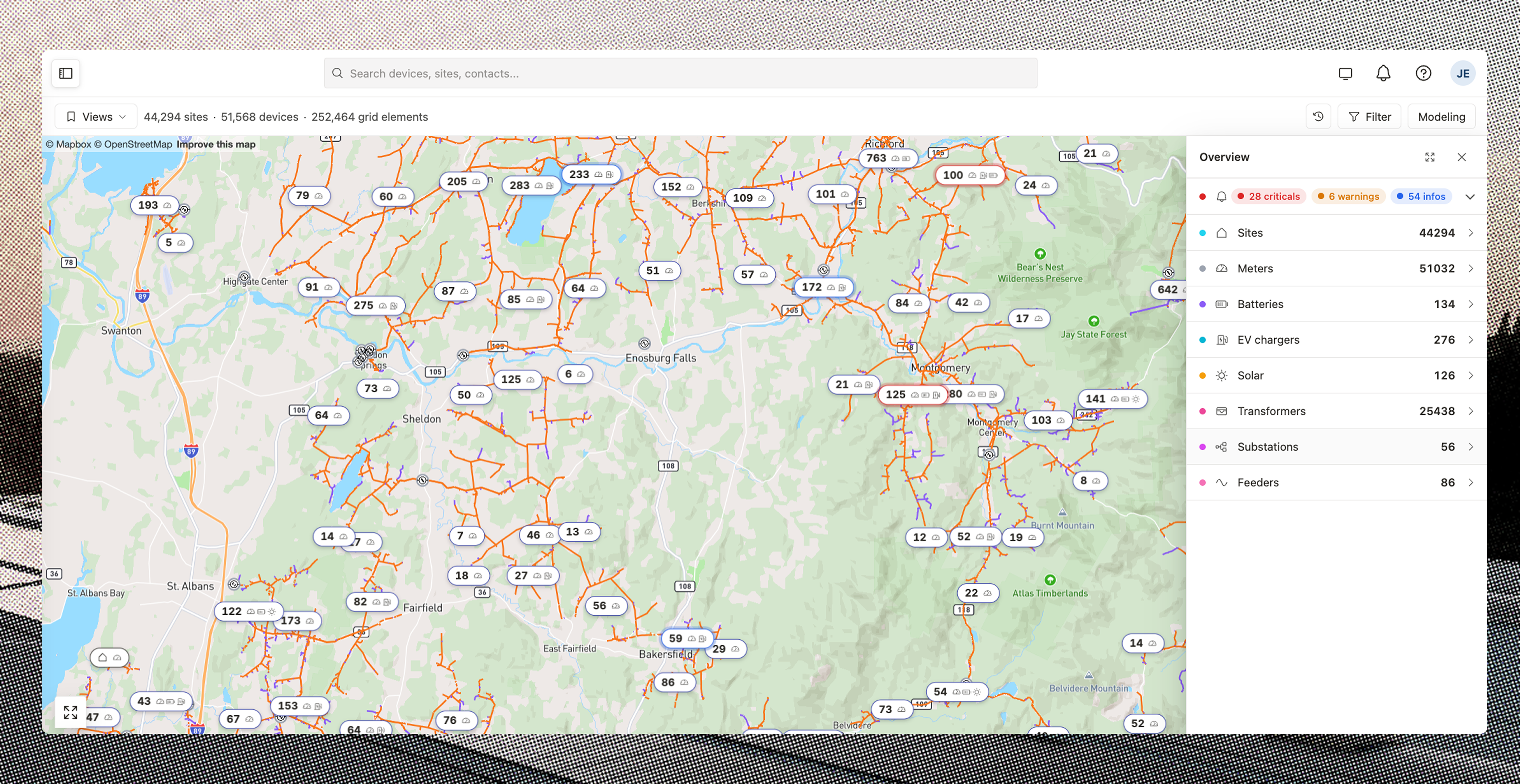
Everything in Texture is tied to a site, the physical service location. Devices, meters, enrollments, and eligibility are all attached to it. That's the foundation that makes the three steps above work: when a member signs up, the enrollment validates against a real account, and when a device comes back from the OEM, it attaches to the service location that owns it.
But loading your customers and sites isn't something you’ll have to do every time you launch a program. It's done once during onboarding, typically via bulk upload via CSV and address validation. After that, your member data is in Texture, and every new program you stand up has something to anchor to. You can see where DERs already sit and market the next program to the members who qualify, not the whole territory.
The point
Program launch is always going to take work. There's coordination that can't be shortcut, and a co-op that's launching its first DER program is learning the process as it goes.
But the software shouldn't be one of the things you're learning to work around. It should handle the mechanical parts like importing members, connecting devices, tracking who's signed up, so that your team can focus on the parts that actually require human judgment: the legal review, the OEM relationship, the outreach to members.
If you want to see how this would work for your program, we'll walk you through it.

